The screens behind each step
Every activity is tied to the user interface screen where it happened, so the step can be reviewed rather than described.

Go past which application was open to what was actually done inside it: individual activities, the business data on the screen, interruptions, application switches and task-level causes — at mouse-click and keystroke granularity, and with non-intrusive, no-install desktop-recording software.
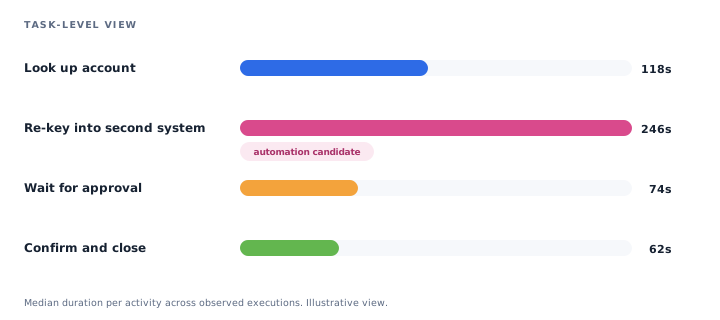
Illustrative view of discovered task detail.
Application usage tells you somebody spent half a day in the claims application. It does not tell you whether they processed forty claims or one, approved or rejected them, got stuck, or accomplished anything useful. Deep Task Mining™ goes past which screens were used to the employee activities and business data inside them.
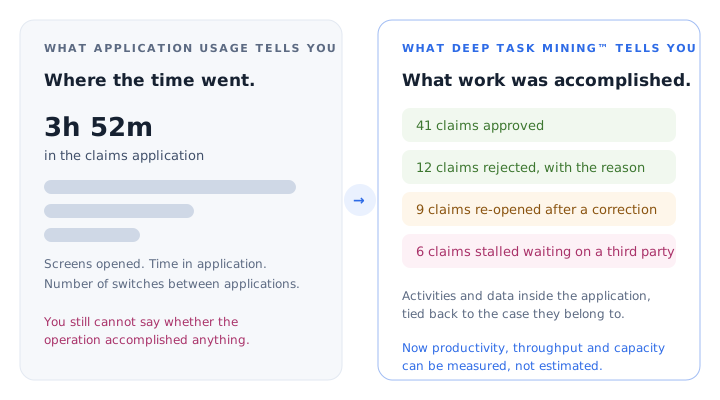
Never lose a detail of what people do in office tools and business applications, how their time is spent, and which tasks can be standardized, improved or automated.
Stereologic filed for its task-discovery patent in 2009, covering the use of optical character recognition together with user-system interaction to discover employee tasks. The U.S. patent was granted in 2019. Task mining is not an add-on here — it is where the technology started.
Task detail is what makes a change defensible: a reviewer can see the actual step, in the actual system, with the actual time against it.
Every activity is tied to the user interface screen where it happened, so the step can be reviewed rather than described.
Duration for each activity and for the task end to end, across the observed executions rather than a single walkthrough.
User inputs are captured as part of the activity — checking a checkbox, choosing a menu item, and the rest of the small decisions that carry the work.
Which application each activity happened in — mainframe, ERP, CRM, browser, spreadsheet or a custom internal client.
The reason task mining usually stalls is not analytics. It is the endpoint installation, the privacy conversation and the noise in the data.
Employee tasks are extracted and mapped with non-intrusive, no-install desktop-recording software.
Interruptions and distractions that normally distort task measurement are separated out, so task time reflects the work.
Obfuscation removes private employee and client data from what is captured and shown.
Recognition holds regardless of how many systems are involved, including Excel-heavy work.
Frequency and duration are the obvious way to rank tasks for automation, and they are rarely enough on their own. Task detail also shows the effect a task has on service quality and customer experience, whether it carries real judgement, and how much of its elapsed time is waiting rather than working.
That is the difference between a list of automation candidates and a prioritized one. Where a task is worth automating, the same discovery output — steps, screens, inputs and systems — becomes the specification the build team works from, instead of a fresh round of workshops.
Turn task detail into timing, variation and sized opportunities.
Quantify it firstProcess IntelligenceDecide what should be standardized, improved, automated or kept human.
Automate what is worth automatingAI & Automation ReadinessExpose variation and workarounds before writing the standard.
Standardize complex workProcess StandardizationNo. Employee tasks are extracted and mapped with non-intrusive, no-install desktop-recording software, and without asking people to change how they work. Deployment and data handling are set out on the Security & Deployment page.
Interrupted work is still measured correctly. Even when tasks are frequently interrupted and people move between them, each task is documented separately, with its own activities, durations and outcome.
Yes. Task recognition holds regardless of the number and type of systems involved, including work that is eight hours a day of complex spreadsheet manipulation.
Recognition is AI-driven. Approval is not.
Recognizing that a screen belongs to the claims application is one thing. Recognizing that the employee rejected a claim, on what basis, against which policy number, is what turns activity into business meaning — and that is AI work.
Illustrative claims-processing example. The same three hours and fifty-two minutes, read two ways.
This shows where time was spent.
This shows what work was actually accomplished.
Stereologic connects this task-level understanding with the end-to-end process — cases, flows, handoffs, variants and outcomes.
Illustrative example for explanation. Not an actual client result.
Choose one task your team believes it understands. We will show what task-level discovery reveals about its steps, its interruptions and its real duration — before anyone builds anything.